


Southwest Airlines: Travel App
4.459.42K Reviews
App Specs
- Version
- 13.13.1
- Updated On
- License
- Free
- Downloads
- 10,000,000+
- Developer
- Southwest Airlines
- Categories
- Travel & Local
- Platform
- Android, iOS
Screenshots

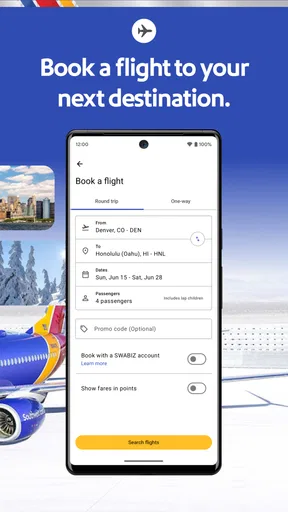
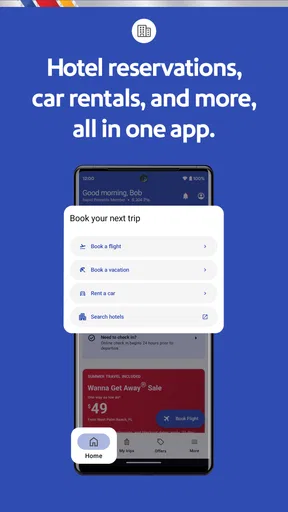
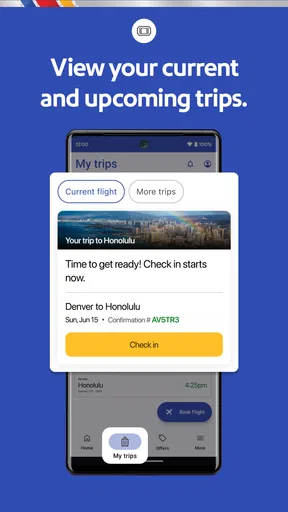

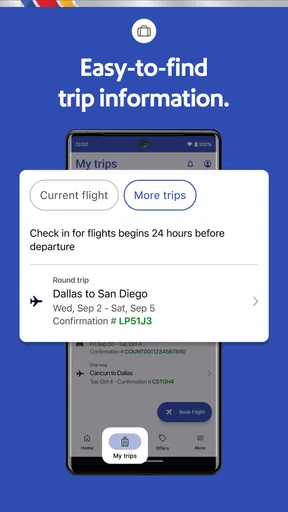
 Analysis by AppCompare
I like a travel app best when it reduces the number of little decisions I have to make on a travel day. The Southwest Airlines app is most useful when Southwest is already part of the plan: it brings flight booking and trip management into one place, rather than asking me to piece together every airline task across separate screens. I’d think of it as a practical companion for Southwest trips, not a universal travel planner that replaces every tool I use.
That distinction matters. The app is made by Southwest Airlines, and its strongest purpose is helping travelers handle the airline side of a journey. It also reaches beyond flights with hotel and car rental booking, but I would still compare those options with other sources before deciding. Convenience is valuable, yet it is not the same thing as proving that a bundled choice is the best fit for every itinerary.
Where the app stands today
As a free Travel & Local app, it has a broad audience: its Everyone age rating makes it suitable for general use, and it has passed the 10 million install mark. An average rating of 4.5 from around 166,000 ratings suggests that many travelers find it useful, though that figure is not a guarantee that every workflow will feel smooth on every phone. I’d weigh it alongside my own needs, especially if I only fly Southwest occasionally.
The app’s current version is 12.13.3, and its history reaches back to a release on November 29, 2010. That long-running presence tells me this is an established airline app rather than a new experiment. It does not, by itself, tell me exactly what changed in each release, so I treat the version number as a snapshot of the current product, not a promise of any particular new feature.
What the long-running product means for regular travelers
For someone who flies Southwest often, having flight tasks and trip details grouped in the airline’s own app can make repeated journeys easier to manage. You do not have to relearn a separate interface for each booking, and the app gives you one familiar place to return to when checking a trip. That consistency is more useful to me than a flashy feature I might use once and forget.
There are 59,000 reviews alongside those ratings, so the app has drawn plenty of feedback from people with different travel habits. I would not read a single average as a verdict on every detail: a frequent flyer may care about quick access to an itinerary, while an occasional traveler may mainly want to book and find a boarding pass. The right test is whether the tasks you personally repeat are easy to reach when you need them.
How it fits into an actual trip
Imagine booking a Southwest flight for a weekend away, then needing to check the itinerary while packing and pull up the boarding pass on the way to the airport. Keeping those airline details together can reduce the last-minute hunt through email. If plans include a hotel or rental car, the app can also help you explore those arrangements without switching immediately to another service.
Worth Reading Before You Choose

EA SPORTS FC Mobile 26 Is a Bigger Football Game, but It Takes Time

Flipboard Shows What News Apps Must Do Beyond the Feed

Switching to Android Auto Means Rethinking Your Driving Routine

Google Calendar Makes a Crowded Week Easier to Manage

Ludo King Makes the Most of the Minutes Between Plans

Baby Panda World Brings Quick Play to Modern Phones, but Its Game Library Feels Busy
My useful habit would be to review the itinerary before leaving home, then open the app again when I’m preparing to travel rather than waiting until I’m in a crowded line. I’d also keep essential trip information accessible in another sensible form if I’m worried about battery life or connectivity. An app can simplify access, but depending on a single phone for every travel detail creates its own avoidable risk.
Where I would compare alternatives
Compared with a general booking service, the Southwest app has a narrower center of gravity: it is built around Southwest rather than giving me a broad view of every airline. That focus is a strength when I have already chosen Southwest, since airline-specific information and tasks belong close together. It is a limitation when I am still deciding which carrier or route makes the most sense.
For that early planning stage, I would use a broader travel search or compare airline options directly, then return to Southwest’s app when I want to handle a Southwest booking. The same judgment applies to lodging and car rental: in-app booking is convenient, but travelers who prioritize comparing many providers may prefer a dedicated comparison service. I would not assume that keeping everything in one place automatically makes it the cheapest or most flexible choice.
The Ultimate Travel Companion
First things first, the Southwest Airlines: Travel App is all about convenience. From booking your flights to checking in, everything is just a tap away. The interface is super user-friendly, which I absolutely love. There’s nothing worse than a confusing app when you're trying to catch a flight! With Southwest, they've kept it simple and straightforward.
Booking Made Easy
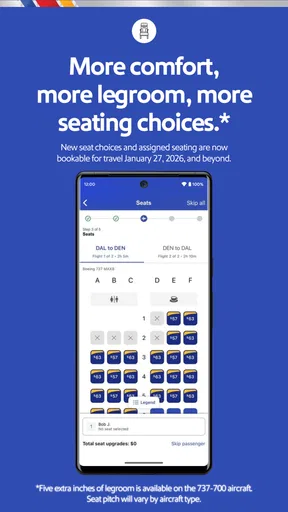
Booking a flight couldn't be easier. With just a few taps, you can find and book flights. The app gives you all the details you need, from flight times to seating options. Plus, it often comes with some sweet deals you wouldn’t want to miss. I’ve snagged a few discounted flights myself!
There is a useful trade-off between speed and careful planning here. If I already know my destination and rough travel dates, booking in the airline app keeps the process focused on Southwest rather than making me sort through a wide field of unrelated options. If my dates are flexible or I’m undecided about the carrier, I’d compare elsewhere first, then use the app once I know what I want to book. That two-step approach helps avoid mistaking a quick checkout for a complete comparison.
Stay Updated on the Go
One of my favorite features? The real-time updates. You get notifications about your flights, gate changes, and even baggage claim information. This feature has saved me from a few potential airport nightmares. If you’re like me and tend to cut it close with your flights, this is a lifesaver.
For a less rushed trip, I’d still check the airport information displays and listen for announcements instead of treating a phone notification as the only source of truth. The app is helpful for keeping travel changes close at hand, but an airport is a noisy, fast-moving place, and a quick glance at the surroundings is a sensible backup. I’d also make sure notifications are enabled if I want the app to alert me rather than relying on memory to reopen it.
Managing Your Travel Plans
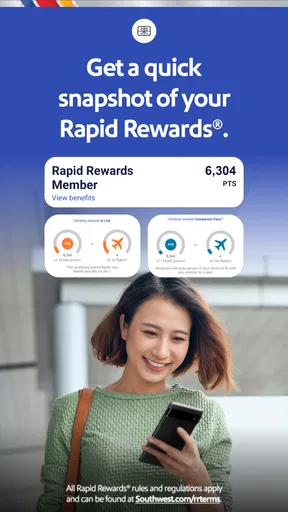
The app also does a fantastic job of helping you manage your travel plans. You can view your itineraries, check your Rapid Rewards points, and even access your boarding pass—all in one place. This level of organization keeps the stress levels down, which is crucial when traveling.
That single-place setup is especially handy when I’m coordinating a trip with someone else. I can check my own itinerary and pass without digging through old messages, while still sharing the relevant travel details with my companion in whatever way works for us. I would not assume that having one traveler’s pass in the app automatically solves coordination for a whole group; each person should know where their own essential travel information is and how they will retrieve it.
Extras That Make a Difference
Beyond the basics, Southwest has thrown in some extras that really enhance the travel experience. For instance, you can book rental cars and hotels directly through the app. The integration is seamless, which means less hassle and more time to focus on your trip.
These extras make the most sense when simplicity is more important than surveying every available provider. For a straightforward overnight stay or a basic car need, being able to look at travel arrangements in the same app can reduce context-switching. For a special trip with specific location, room, or vehicle requirements, I’d take more time to compare details before committing. The sensible workflow is to use the built-in option as a convenient starting point, not to treat it as the only place worth checking.
Another cool feature is the ability to track your baggage. Losing luggage is a traveler's worst nightmare, but with this app, you can keep tabs on your bags and have peace of mind.
Baggage tracking is most useful as a way to stay informed, not as a substitute for keeping the bag tag and travel documents close until the trip is finished. If a bag is delayed, I would use the app’s information as one part of handling the situation and ask airline staff for help where needed. That balance keeps the convenience without expecting a phone screen to resolve every airport problem on its own.
Who will get the most from it
I’d recommend the app first to people who already choose Southwest regularly, travelers who prefer handling bookings and day-of-flight tasks on their phone, and anyone who values having an itinerary, boarding pass, and loyalty details gathered in one place. It is also a reasonable choice for a less frequent Southwest customer who wants a direct route to airline-specific trip information instead of relying only on email.
It is less compelling if you rarely fly Southwest, want to compare a wide range of airlines in one interface, or prefer keeping every part of travel planning in a general-purpose service. Those travelers may still find the airline app useful after choosing a Southwest flight, but they do not need to make it their main planning tool. I’d install it for a Southwest trip when its focused tools solve a real need, rather than keep it for features I’m unlikely to use.
What I would watch as it evolves
With version 12.13.3 as the current snapshot, I’d judge future changes by whether they make common tasks clearer and more dependable: finding a booking, reaching the boarding pass, and following travel information without extra friction. The app’s long history gives existing users a familiar base, but a version number alone cannot tell me which changes matter most in daily use. For regular flyers, the practical question is whether updates preserve the workflows they depend on while making them easier to complete.
I’d also pay attention to how well the app continues to serve both sides of its audience: people who only need a simple flight tool and travelers who use more of its trip-planning options. More features are not automatically better if they make the basic tasks harder to find. For now, I see its value in focused airline management, with broader comparisons still best handled by tools designed for that job.
Final Thoughts
All in all, the Southwest Airlines: Travel App is a solid choice for anyone looking to simplify their travel logistics. It combines simplicity with functionality in a way that feels intuitive and efficient. If you’re planning a trip anytime soon, I’d definitely recommend giving it a try. It’s like having a travel buddy who’s got your back, every step of the way.
Pros
- User-friendly interface simplifies booking.
- Real-time flight status updates.
- Easy access to boarding passes.
- Rapid Rewards integration for frequent flyers.
- Customizable travel alerts.
Cons
- Limited international flight options.
- Occasional app crashes reported.
- No offline mode for itinerary access.
- In-app purchases for certain features.
- Limited support for non-English languages.
FAQs for Southwest Airlines: Travel App
What features does the Southwest Airlines Travel App offer?
The Southwest Airlines Travel App provides a range of features designed to enhance your travel experience. You can book and manage flights, check in, access your boarding pass, and track your flight status. Additionally, it offers features like Rapid Rewards tracking, in-flight entertainment options, and real-time notifications about gate changes and flight updates.
Is the Southwest Airlines Travel App free to use?
Yes, the Southwest Airlines Travel App is free to download and use. It is available on both Android and iOS platforms. While the app itself is free, any purchases or bookings made through the app, such as flight tickets or in-flight services, will incur standard charges as per Southwest Airlines policies.
Can I use the app to check in and access my boarding pass?
Absolutely. The Southwest Airlines Travel App allows you to check in for your flight up to 24 hours before departure. Once checked in, you can access your boarding pass directly from the app. This feature streamlines the process, eliminating the need for paper tickets and making airport navigation more convenient.
Does the app provide information on Rapid Rewards points?
Yes, the app includes a feature that allows you to track your Rapid Rewards points. You can view your current point balance, monitor your progress towards earning flights, and access special offers related to the Rapid Rewards program. This makes it easy to manage and maximize your loyalty benefits directly from your mobile device.
How reliable are the notifications and updates from the app?
The Southwest Airlines Travel App sends real-time notifications and updates, ensuring you stay informed about your flight status, gate changes, and any delays. The app is designed to provide timely and accurate information, but it is always advisable to double-check details at the airport or with airline staff for the most current information.


